SDR Without a Radio
You do not need to own a radio to run a world-class SDR cockpit. You need a laptop, an internet connection, and two free downloads. Here is exactly how.
As you read this, there are roughly 840 KiwiSDR receivers online around the world. They are free to use. They sit on real antennas — Beverages, 270-foot doublets, active loops out on quiet rural land where the noise floor is low. Anyone can listen through them.
Almost everyone who does uses a browser tab.
There is a better way, and it costs nothing.
What a browser tab actually costs you
Let us be fair first, because this matters. The KiwiSDR's own web interface is good. It ships twenty-six extensions — TDoA direction finding, FT8, WSPR, a CW skimmer, SSTV, FAX. It has three noise-reduction algorithms and a noise blanker. It has a real, calibrated S-meter reading in dBm. Anyone who tells you it is primitive has not used it.
That is not the problem. The problem is architectural, and it appears the moment you want to use more than one receiver.
Your settings do not follow you
The Kiwi web interface stores your preferences in your browser, keyed to that one receiver's address. Tune a receiver in Phoenix, set your noise reduction the way you like it, save a few memories. Now open a receiver in Vermont. You get a completely blank configuration. Nothing carries across.
One tab per receiver, and they cannot hear each other
Want to compare how a signal lands in Montana versus Maryland? You get two browser tabs, and no way to hear them together. There is no side-by-side, no synchronised tuning, no comparison of any kind.
It does not work on your phone
This is not our criticism. It is printed in the interface itself:
There is no support for small-screen mobile devices currently.
You will get cut off
Receiver owners set time limits, and they are enforced. One Phoenix receiver drops you after a hard two-hour cap. You will be disconnected in the middle of listening.
Finding a receiver means reading a wall of links
The public directory is a flat list of raw address-and-port links sorted by signal-to-noise ratio. Location and antenna descriptions are free text, written by each owner, in no consistent format.
Two myths worth putting down while we are here. There is no universal "two user limit" on KiwiSDRs — the channel count is set by each owner and ranges from one to eight. And there is no "fourteen day limit" either; that claim has no source behind it.
AetherSDR, and the gap
AetherSDR is a native software-defined-radio client for Linux, macOS and Windows. It is free, open source, and under heavy active development.
It is built as a client for FlexRadio — the FLEX-6000 and 8600 series. Superb radios. They also cost thousands of dollars.
And here is the interesting part: AetherSDR already speaks KiwiSDR fluently. It has an entire subsystem devoted to it. But the software wants to see a radio before it will let you into the cockpit. The project says so itself, in an open design proposal:
The current KiwiSDR integration is exposed as client-owned virtual RX antennas attached to a real Flex slice and panadapter. That is correct when a Flex radio is connected, but it does not help users who do not own a Flex radio.
So we give it a radio. A radio that does not exist.
flex-sim: a FlexRadio made of software
flex-sim is a synthetic FlexRadio-6000 emulator, written by Nigel Fenton, G0JKN — who is no stranger to this project; he is an AetherSDR contributor with twenty-five commits to his name.
It is a single file with no dependencies, and it does three things:
It answers SmartSDR's discovery broadcast, so AetherSDR finds it automatically, exactly as it would find a real radio on your network.
It speaks the real FlexLib control protocol.
It streams synthetic spectrum, waterfall and meter data, so the cockpit comes alive.
It presents itself as a FLEX-6600. It comes with a browser control panel where you choose test patterns — a two-tone signal, CW, a synthesised SSB voice, a swept carrier, a calibration card.
It generates no real radio signal whatsoever. It receives nothing. It is a convincing, programmable ghost, and its only job is to hold the door open.
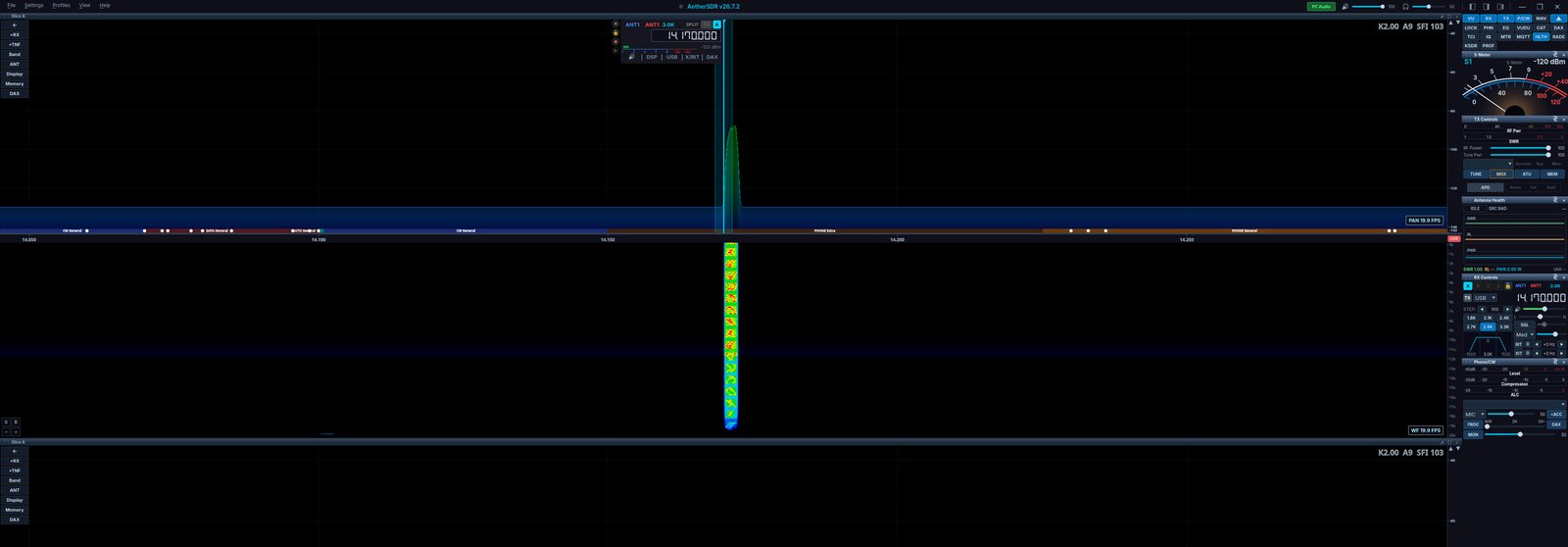
AetherSDR driving a FlexRadio that does not exist. The panadapter, waterfall and S-meter are all live — fed entirely by flex-sim's synthetic signal engine.
The key idea: a KiwiSDR is an antenna
This is the concept that makes the whole thing click, so it is worth saying slowly.
AetherSDR does not treat a KiwiSDR as a separate window, or a plugin, or a special mode. It treats it as an antenna.
They are called KiwiSDR RX Antennas. You configure one, and it appears in the receiver's antenna menu, right next to ANT1 and ANT2. You select it the way you would throw an antenna switch.
And then everything downstream simply works, because as far as the rest of the application is concerned, a signal is arriving on an antenna port. The panadapter shows that receiver's spectrum. The waterfall fills with its signals. The S-meter reads its real signal strength in dBm. The audio comes out of your speakers, with your own noise reduction applied on top.
Because each receiver gets its own slice, you can run several KiwiSDRs at the same time, all audible together, in one window.
That is the thing a browser tab fundamentally cannot do.
Being a good guest on someone else's antenna
Here is the question a thoughtful operator asks next, and it deserves a straight answer: is this not just freeloading on other people's receivers?
No — and the reason is worth understanding.
Every KiwiSDR owner publishes a setting that declares how many channels, if any, they are willing to open to clients that are not web browsers. It is their stated policy, and AetherSDR honours it without argument:
Receivers whose owners have set that value to zero — browsers only — are removed from the list entirely. They are never shown to you, and AetherSDR will not connect to them. That is currently around 126 of the 840 receivers online.
AetherSDR identifies itself honestly in every single request. It never disguises itself as a browser.
The receiver directory is only fetched when a human clicks the button. One click, one fetch.
The project's own design document puts it plainly:
If an operator blocks AetherSDR, that is their answer and it is honored.
A local example makes this concrete. There is an excellent KiwiSDR right here in Phoenix — a Wellbrook active loop covering 0.1 to 30 MHz, and one of the best-performing receivers in the state. Its owner has API access switched off. So it does not appear in AetherSDR's list, and the software will not touch it.
That is his call. The software respects it. That is what good citizenship looks like in code.
Doing it, step by step
What to download
AetherSDR — take the Windows portable ZIP if you want to avoid an installer. There are macOS, Linux and Raspberry Pi builds too.
flex-sim — a single executable.
Step one — start the virtual radio
Double-click flex-sim. A console window opens and prints the address of its control panel, something like http://192.168.1.50:8731/. Open that address in a browser.
Step two — connect AetherSDR to it
Launch AetherSDR. A radio appears in the list: a FLEX-6600, with the serial number FLEXSIM00. Select it. Connect.
The panadapter lights up. Choose a test pattern in the control panel and watch the waterfall and the S-meter respond to it. You are now driving a full SDR cockpit, and you do not own a radio.
Step three — add a KiwiSDR as an antenna
Go to Settings, then Radio Setup, then the Antennas page. Find the group headed KiwiSDR RX Antennas, and click Browse public.
A dialog opens listing every receiver whose owner permits this — with columns for the receiver, its location, how many people are on it, its API policy, and its limits. There is a filter box; type a place name.
Pick one. Click Add selected. Tick Auto-connect if you want it to open every time you start the program.
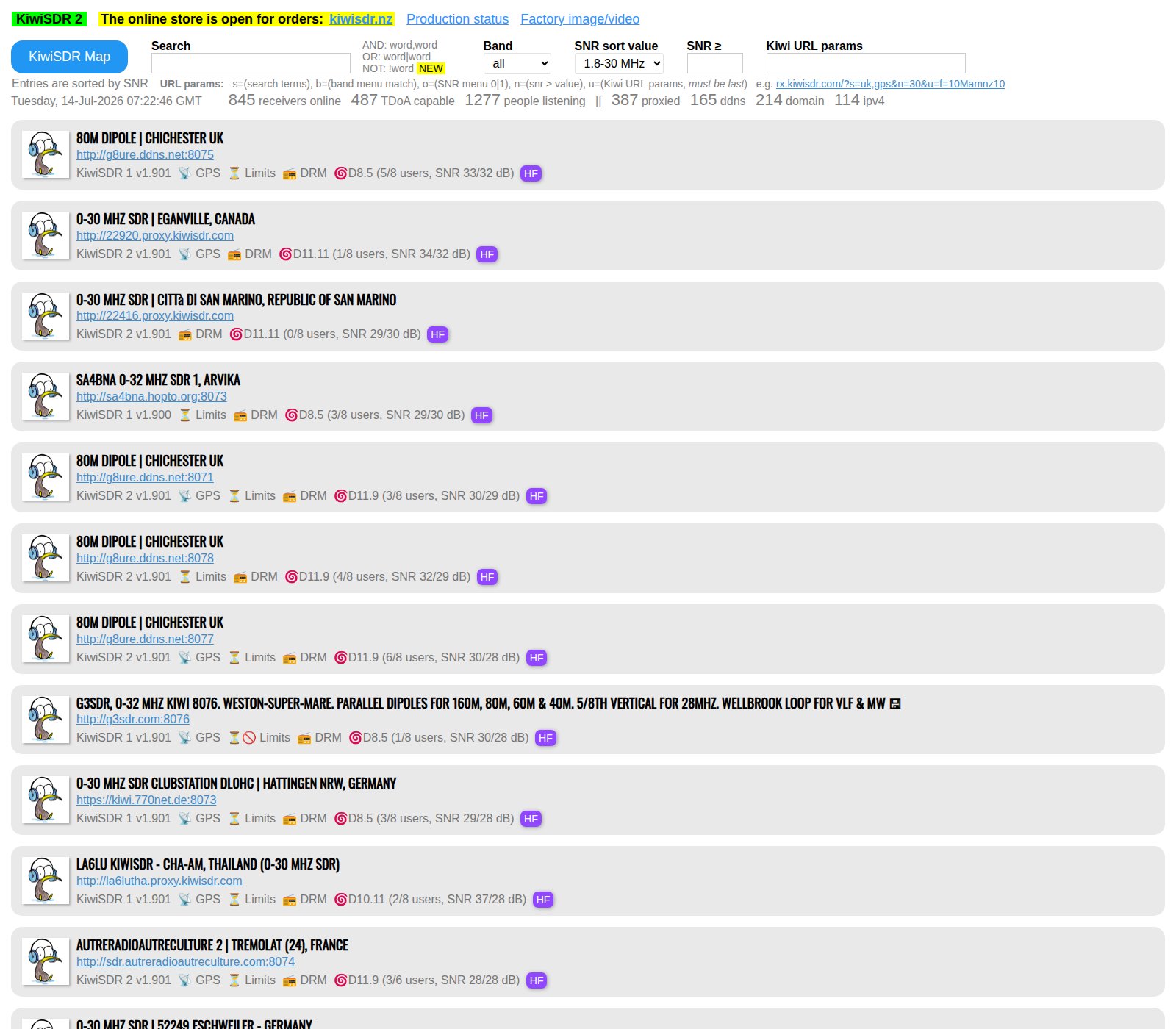
How you find a receiver today: a flat list sorted by signal-to-noise, with location and antenna written free-hand by each owner. Around 845 receivers were online when this was taken.
Step four — select it as your antenna
On the panadapter, open the RX antenna menu. Your KiwiSDR is now listed there by name, sitting alongside ANT1. Select it.
That is the moment. The audio switches to the remote receiver. The waterfall becomes its spectrum. The S-meter starts reading its signal strength.
Step five — prove it works
Tune to 10.000 MHz in AM mode.
That is WWV, the atomic clock time station in Fort Collins, Colorado. It never stops transmitting. You will hear the second ticks, and the tones that alternate between 500 and 600 hertz. You will see the carrier standing straight up in the waterfall.
When we tested this through a receiver in western Montana, WWV arrived at S9 plus 9, or minus 64 dBm — and the tones were all measurably there in the audio.
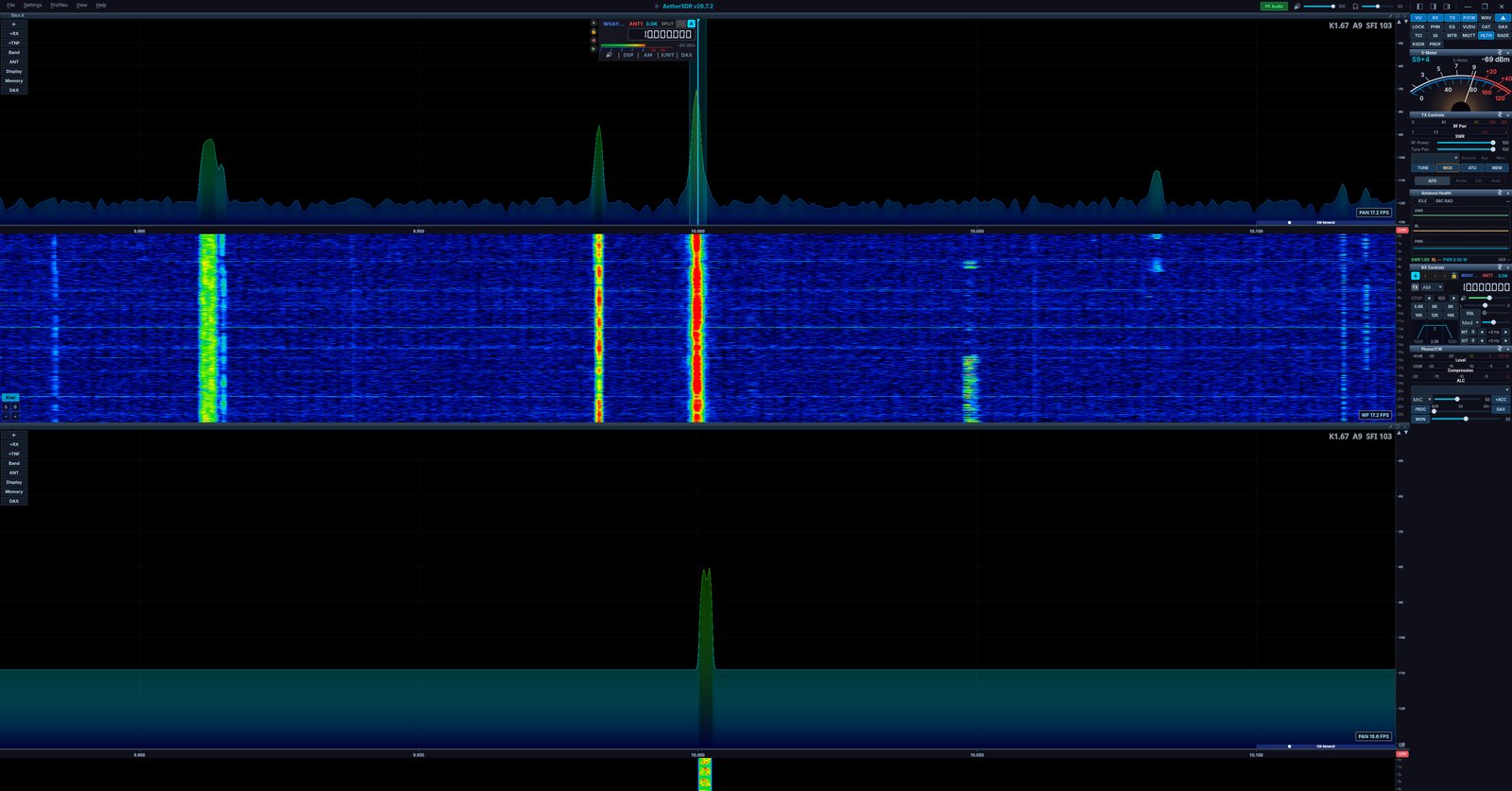
WWV on 10.000 MHz at S9+4, arriving through a 75-metre half-wave in western Montana — while the flex-sim panadapter runs below it. Two radios, one window, and neither of them is in the room.
Step six — now add a second one
Add another receiver, on another slice, somewhere else in the world.
Both are now live in the same window at the same time. Two waterfalls. Two audio streams. One application. You can hear the same signal arriving in two different places at once.
That is the payoff. Now go and do it with three.
What you gained, and what you did not
Against a browser tab, you now have: many receivers at once through one mixer, instead of tabs that cannot hear each other. Settings that follow you everywhere instead of resetting at every new receiver. Your own noise reduction applied on top of the remote audio. Real error messages — "queued, position two" — instead of a spinner, and the client retries automatically when a slot opens up. A searchable, policy-aware picker instead of a wall of links. And when you eventually do buy a radio, it is the same cockpit.
Now the honest half, because a tool you cannot criticise is a tool you do not understand:
No TDoA. The Kiwi's own web interface can do direction finding. AetherSDR cannot.
No Kiwi extensions — no FT8 decoder or CW skimmer from inside AetherSDR.
The audio is demodulated at the far end, in mono. You cannot re-demodulate it locally.
Recording a KiwiSDR did not work in our testing — the audio played fine through the speakers, but the saved file came out silent. Do not rely on it without checking first.
Session limits still belong to the owner, and they still apply to you.
Sometimes the right tool is still the browser. Use whichever one fits.
Where this goes next
Free, today. flex-sim and any public KiwiSDR. Everything described above.
For about thirty dollars. The same author wrote a companion tool that bridges an RTL-SDR dongle — or an Airspy, an SDRplay, even an IC-7300 or IC-9700 — into AetherSDR as a virtual FlexRadio. Now it is real radio frequency energy, on your antenna, in the same cockpit.
And when you do buy the FlexRadio. A feature called Receive Sync unlocks. It uses cross-correlation to time-align your own antenna with a remote KiwiSDR, in both the audio and the waterfall. You can listen to your own station and a receiver two thousand kilometres away, phase-aligned, and hear the difference in propagation directly, in real time.
No browser tab will ever do that.
The point
The barrier to a serious SDR cockpit was never the software. The software is free.
The barrier was that the software wanted to see a radio first.
A virtual radio satisfies that — and the entire world of public receivers opens up behind it.
Download two files. Double-click one of them. Connect. Then pick an antenna in Montana, and go and listen to the world.
Links
AetherSDR — the client. Look under Releases.
flex-sim — the virtual radio.
Aether-gate — bridge a real dongle or rig into AetherSDR.
KiwiSDR public receivers — the directory.
Written for TBARC by Chris Johnson K6OZY. Every step in this guide was tested end to end before publication — AetherSDR v26.7.2, flex-sim v0.2.0, and a live KiwiSDR in western Montana receiving WWV.